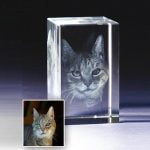

Yes — Incrystals can engrave almost any photo into a 3D crystal, including old printed photos, blurry phone snaps, low-resolution images, dark or faded shots and scanned prints from decades ago. Every order includes free AI image enhancement plus manual restoration by our UK team. UK-made by Incrystals from £17.99, with a free digital preview before production, free text engraving, and dispatched in 1–2 working days.
The single most common question we get from customers is: “My photo isn’t very good — will it still work?” The honest answer, in the overwhelming majority of cases, is: yes. The photos that mean the most to people are rarely studio portraits. They are creased Polaroids found in a shoebox, blurry phone shots of a beloved pet caught mid-yawn, faded prints of grandparents from the 1970s, scanned negatives, photo-booth strips, screenshots from a video call. The very imperfection of these photos is often what makes them irreplaceable.
This article walks through every type of imperfect photo we routinely engrave, what our free AI image enhancement does behind the scenes, when our team steps in for manual restoration, and the rare cases where a photo genuinely can’t be saved.
Why So Many People Worry Their Photo “Isn’t Good Enough”
Photo crystals are often bought to commemorate someone or something important — a person who has passed away, a wedding day, a beloved pet, a child’s first year, a milestone holiday. The photos that come with that emotional weight are almost never perfect. They are often taken decades before phone cameras existed; printed, faded and then scanned at home; shot on early digital cameras at very low megapixel counts; cropped, compressed and re-shared until they look soft; pulled from social media where platforms aggressively compress images; or simply taken by someone who isn’t a photographer, in the middle of a moment they didn’t want to interrupt.
Customers see those imperfections and assume the result will look the same — soft, faded, low-detail — engraved permanently into glass. We understand the worry. But the modern combination of AI image enhancement and hand-finished restoration means we can usually recover far more detail than the photo itself appears to contain.
The Kinds of Imperfect Photos We Successfully Engrave Every Day
These are the most common photo conditions we receive, in roughly the order we see them.
1. Old printed photos (1960s–1990s)
You don’t need to scan these yourself. Many customers simply post us the print — we scan it at our UK studio, return the original with the finished crystal, and digitise to a far higher resolution than a phone-camera-of-a-print would produce. Faded colours, slight discolouration and small surface marks are all handled in restoration.
2. Phone snapshots that look “a bit soft”
Modern smartphones produce images that look fine on a small screen but soften noticeably when blown up. Our AI enhancement specifically targets this — it adds back perceived sharpness in the eyes, hair texture, fur and edges where it matters most.
3. Low-resolution images from social media
Facebook, Instagram, WhatsApp and Messenger all compress photos heavily, sometimes by 70–80%. A photo you saved from a friend’s Facebook post may be 800px wide instead of the original 4000px. We can still work with these — the enhancement step doubles or quadruples the resolution and recovers most of the lost detail.
4. Dark or underexposed photos
A photo taken indoors at evening, in a pub, in a candle-lit moment or at a Christening can come out far darker than the eye saw it. The AI enhancement brightens shadows and rebalances exposure without blowing out highlights. If the AI alone can’t quite get there, our team adjusts curves and tone by hand.
5. Overexposed or washed-out photos
Photos taken in bright sun or with a flash can lose colour and detail in the highlights — skin tones go pale, eyes lose colour, fur looks bleached. We can rebalance these by pulling back the highlights and reintroducing natural colour, then re-engraving the texture.
6. Blurry or motion-blurred shots — including extreme blur
A pet mid-zoomie, a toddler running, an action photo, even photos so out of focus you’d assume they were unusable — our AI deblur models recover a remarkable amount of detail. We can rebuild edge structure and facial clarity even from extreme blur. You’ll see a free digital preview before we engrave so you can confirm the result.
7. Tiny crops or distant subjects in a larger scene
If your favourite photo of your gran or your dog is a small part of a much wider shot, send it anyway. Our upscaling and restoration process is now able to isolate, enlarge and rebuild detail in subjects that occupy only a small portion of the original image.
8. Group photos where you want only one person or one face
We routinely receive a group photo with the request “can you isolate Grandad on the left?” This is part of the free background and subject editing we do on every order. We crop, clean up the surrounding area, and the engraving shows only the subject you want.
9. Photos with busy or distracting backgrounds
A child in front of a cluttered Christmas tree, a pet against a busy carpet, a portrait with another person walking through the shot. We remove backgrounds by default on every order — this is included free — which makes the subject pop in the final 3D engraving.
10. Black-and-white photos
These engrave beautifully into crystal. Black-and-white photos actually have a structural advantage in 3D engraving because the crystal medium itself is colourless — the engraving renders tone naturally, and the contrast in a good monochrome image translates particularly cleanly to laser-engraved dot patterns.
11. Damaged photos — creased, torn, water-stained, faded
Send them anyway. Our restoration process handles surface damage, missing corners, water marks, foxing and fading. We’ve successfully restored photographs that customers thought were beyond saving.
12. Screenshots from video calls or video footage
Frame grabs from FaceTime, Zoom, video baby monitors and home video are increasingly common, especially as memorials. These are often very low-resolution. We use the same AI upscaling and manual cleanup process, and the results are usually far better than the screenshot looked on the call.
13. Photo-booth strips and small Polaroids
The original prints are tiny, often 5cm wide or less. We scan at 600 DPI minimum, which gives us enough data to work with. The resulting engraving fills the crystal at high detail despite the small original.
How Our Free AI Image Enhancement Works
Every order at Incrystals automatically goes through our AI image enhancement step. This is included free of charge and applies to all orders regardless of crystal size or price.
The enhancement does four things in sequence.
Step one — Upscale. The AI roughly doubles or quadruples the resolution of the image using a model trained on millions of real photographs. This isn’t just stretching pixels; the model predicts what the missing detail should look like, based on what plausibly existed in the original scene.
Step two — Sharpen. Soft edges (especially around eyes, hair, fur and outlines) are sharpened in a way that looks natural rather than the “over-sharpened halo” effect you sometimes see from older tools.
Step three — Denoise. Graininess from low-light photography or scanning is reduced, while genuine texture (skin pores, fur strands, fabric weave) is preserved.
Step four — Tone balance. Contrast, brightness and colour are gently rebalanced so the image is ready for the laser to engrave. Underexposed shadows are lifted, overexposed highlights are pulled back.
The result is an image that looks dramatically clearer to the eye and, crucially, holds together when converted to a 3D engraving inside optical glass.
When Our Team Steps In for Manual Restoration
AI is brilliant at most cases but not all. Roughly one in ten orders needs hand-finishing by our designers. Here’s what manual restoration covers.
Heritage photographs. Photos from the 1940s–60s with deep cracks, missing corners or significant fading often need a designer to reconstruct lost areas pixel by pixel, using contextual reference (e.g., reconstructing a torn corner based on what’s around it). We do not invent faces or features that aren’t there; we reconstruct surrounding context only.
Group photo subject isolation. When you ask for “only Grandad,” our designers manually trace the subject and clean up the edges. AI background removal is good, but humans are better at messy edges like hair, fur, sun-flare and glasses.
Colour correction for skin tones. AI can be over-aggressive with skin tone. Where the result looks unnatural, our team manually tunes the colour by eye, ensuring the subject looks like themselves.
Compositing. If you want two photos merged into one crystal (e.g., a couple where you only have separate portraits of each), our team composites them together with consistent lighting and proportions.
Adding text overlays. Names, dates and short inscriptions can be added by our team beneath or alongside the engraved image. Text engraving is free with every order.
All of this manual work is included in the order. You don’t pay extra. You also see a free digital preview before we begin the actual engraving, so if anything looks off you can ask for a different approach.
What We Genuinely Cannot Fix
Honesty matters. There are a small number of cases where even AI plus manual work cannot produce a result we’d be happy putting our name to. Heavy JPEG artefacts from extreme over-compression (often happens with photos shared and re-shared across messaging apps for years) can leave so few usable pixels that even our enhancement tools can’t reliably reconstruct the subject. Subjects mostly obscured by another object, another person or part of their own clothing simply aren’t visible enough for us to engrave clearly.
In these rare cases we’ll tell you honestly during the free preview stage that the result wouldn’t meet our quality standard, and you can choose a different photo before we engrave.
How to Send Us Your Photo
The simplest way is to upload your photo when you place the order through our website. Our system accepts JPG, PNG, HEIC and most other common formats. You do not need to crop or edit the photo first, increase the resolution yourself, convert from HEIC to JPG, remove the background, or colour-correct or sharpen. Send the original as you have it — we’ll handle everything from there.
If your photo is a physical print rather than digital, you have two options. You can scan it at home using a smartphone scanner app (Apple Notes, Google PhotoScan, or Adobe Scan all work well) and upload that. Or post us the original — we’ll scan it at our UK studio at 600 DPI and return the original safely with your finished crystal.
For old photos that you’d like checked before ordering, you can email them to us and we’ll let you know honestly whether we can do them justice.
Frequently Asked Questions About Photo Quality for Crystal Engraving
Can I use a blurry photo for a 3D crystal?
Yes. Our AI image enhancement now restores even severely blurred and motion-blurred photos, rebuilding edge structure and facial clarity. You’ll see a free digital preview before we engrave so you can confirm the result.
Can I use an old printed photo from the 1960s, 70s or 80s?
Yes. You can scan it at home and upload the scan, or post the original print to us — we scan at 600 DPI at our UK studio and return your photo safely with the finished crystal. Faded colours, slight discolouration and surface marks are routinely fixed by our restoration team.
What is the minimum photo resolution for a crystal engraving?
There is no hard minimum. Our free AI enhancement upscales lower-resolution photos automatically and can rebuild detail from images much smaller than you might expect. If you’re unsure, send the photo to us before ordering and we’ll let you know honestly whether it will engrave well.
Can I use a photo where my subject is far away or only a small part of the picture?
Yes. Our upscaling and restoration process can isolate, enlarge and rebuild detail in subjects that occupy only a small part of the original image. Just upload the photo as it is and tell us in the order notes which subject to keep.
Does Incrystals charge extra for photo restoration or enhancement?
No. Free AI image enhancement and manual photo editing — including background removal, brightness and colour correction, sharpening, and subject isolation — are included on every order at no extra cost.
Can you remove the background from my photo?
Yes — by default we remove the background from every photo before engraving, as this gives the clearest and most detailed result in the crystal. If you’d prefer to keep the background, simply let us know when you order.
Can you isolate one person or one pet from a group photo?
Yes. Just upload the group photo and tell us in the order notes which subject to keep. Our team manually traces and cleans up the edges, and you’ll see a free preview before we engrave.
Can you combine two or more photos into one crystal?
Yes. Place your order first, then email us your order number with the photos you’d like combined. Our team will composite them into your chosen crystal shape.
Will you tell me if my photo isn’t good enough before engraving?
Yes. Every order includes a free digital preview before we begin engraving. If we don’t think the result will meet our quality standard, we’ll tell you honestly and you can choose a different photo before we engrave.
How do I send my original printed photo to Incrystals?
You can either scan it with a smartphone scanner app (Apple Notes, Google PhotoScan or Adobe Scan all work well) and upload the scan, or post the original print to our UK studio. We’ll scan it at 600 DPI and return your photo safely with the finished crystal.
For our full list of FAQs, visit our main FAQ page.
Ready to Turn Your Photo — Whatever Condition It’s In — Into a 3D Crystal?
Don’t write off a photo because it looks soft, dark, old or imperfect. Send it to us and let us tell you honestly what we can do with it. Most of the time, the result will surprise you.
Incrystals is a UK studio that makes personalised 3D photo crystals to order, engraved in Britain inside premium K9 optical glass, backed by free AI image enhancement, a free digital preview, free text engraving, and dispatch in 1–2 working days. Prices start from £17.99 and free UK delivery is included on orders over £30.
Browse our 3D Photo Crystal range to choose your shape and size, or read our companion guide How Is a Crystal Photo Gift Made? 3D Laser Engraving Explained for a closer look at how we turn your photo into glass.
The photo doesn’t have to be perfect. The memory already is.